Stop disconnection
When you close the window of your app in oneclick™ or log out of oneclick™, all connections to the server are automatically disconnected.
If you want calculations to continue on the server, you must set this manually on your destination system:
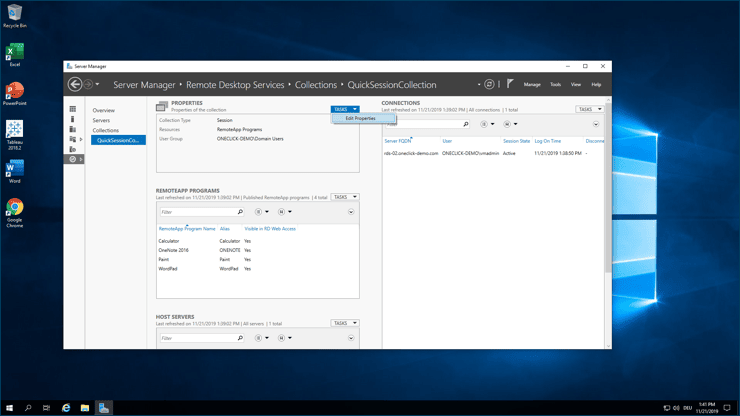
- On your server, go to the Server Manager / Remote Desktop Services / Collections / QuickSessionCollection.
- In the "Properties" area, click on TASKS and then on Edit Properties.
- Here you can configure the session. Select Never on the three dropdowns "End a disconnected session", "Active session limit" and "Idle session limit".
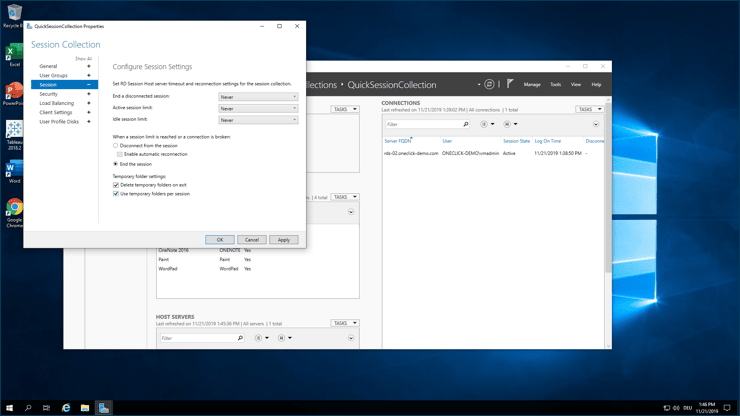
Now your server will not shut down when you close the window or log out of oneclick™.