What`s new in oneclick™?
Version / Release: 2609.02.112
Release date: 30 September 2026
Improvements
Admin stays fast in very large divisions
In divisions with more than 1,000 users or 2,500 app instances, the "Users" and "App instances" tables now load page by page from the server instead of loading the whole list into the browser. Search, filters (including tags and policies), sorting, and "select all" work across all pages, and the footer shows the total count plus how many entries are selected, for example "Entries 1 to 10 of 1202 (1202 selected)". Smaller divisions are unaffected. Several further changes make the admin more responsive in environments with many users, app instances, or networks:
- Large lists load in fewer, larger pages, so the admin stays usable while a list is still loading.
- Tables and filter options are only recalculated when something relevant has changed. This removes the short freezes after menu clicks and when opening the search filter, which now opens immediately.
- After a directory service import, only the changed users are pushed to open admin sessions instead of reloading five complete lists. New, changed, and deleted users appear in the "Users" area without a page reload.
- The "Networks" and "Network security groups" lists load significantly faster.
- The dashboard only requests the records it actually shows and no longer freezes the browser tab in divisions with a very large number of logins.
Refresh button on the dashboard
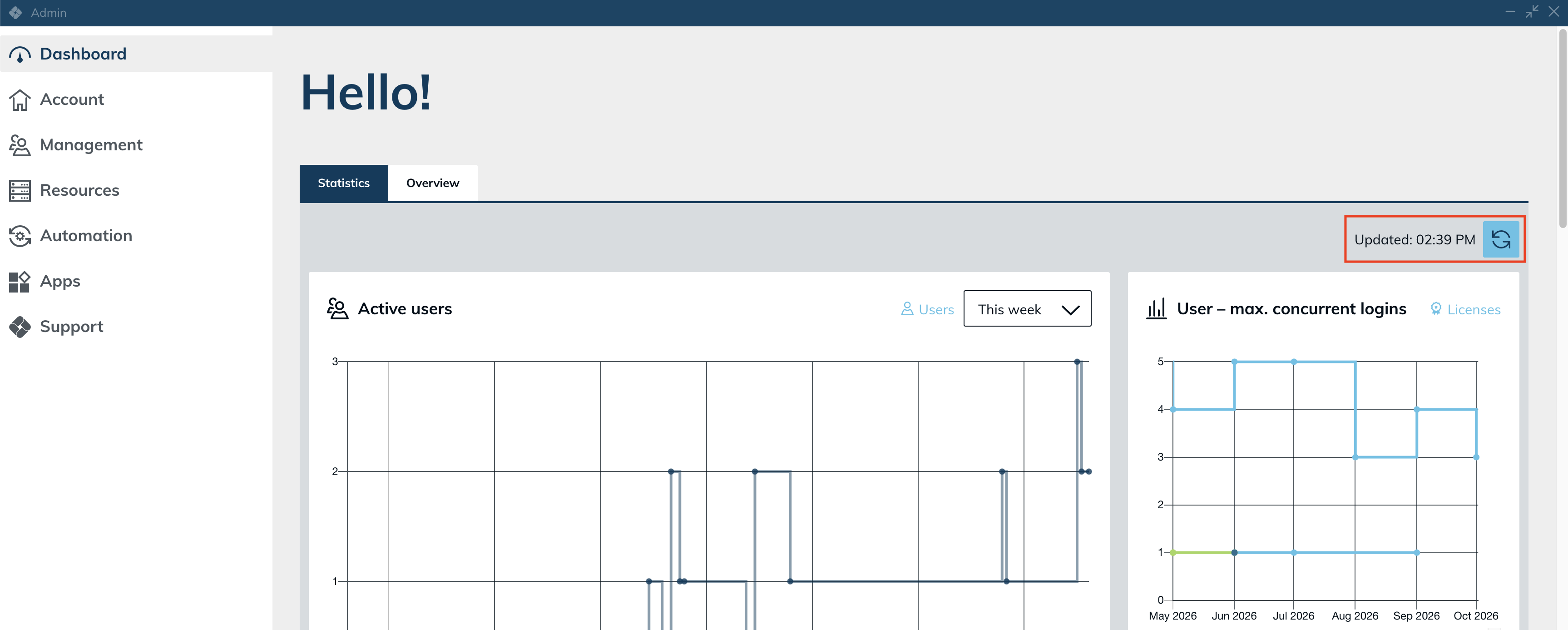
The "Statistics" view of the dashboard now has a refresh button at the top right, with "Updated: HH:MM" next to it so you can see how current the view is. Clicking the button reloads all tiles at once. The logins chart now refreshes every 5 minutes instead of every 20 seconds: its data changes only once a minute, and reloading it that often slowed down the dashboard in large divisions. The other tiles keep their intervals.
Destination and pool changes no longer block the dialog
Adding or removing a port on a destination, deleting a destination, saving an app configuration with a changed destination, or changing the destinations of a pool no longer keeps the dialog spinning for up to a minute in large divisions. The dialog closes at once, and the affected app instances are updated in the background. Saving a pool also no longer waits for the load balancer when its autoscaling configuration has not changed. The destination tile in a destination pool no longer shows an endless loading animation after you save the pool's destination dialog.
Smaller improvements to tables and detail views
- Group details list the members as "Last name, First name", sorted by last name, 20 at a time with "show more".
- The pagination line of a table shows how many entries are selected. The separate counter next to the buttons is gone.
- App instances that were assigned via a group can now be selected by clicking the row.
- The search filter button is fully clickable while the filter is open. Previously only its upper half reacted.
- The group list of a directory service connection no longer skips the first group.
- A deleted user in the dashboard's app start error list no longer shows "A network error has occurred. Please try again."
Clearer preview when importing directory users
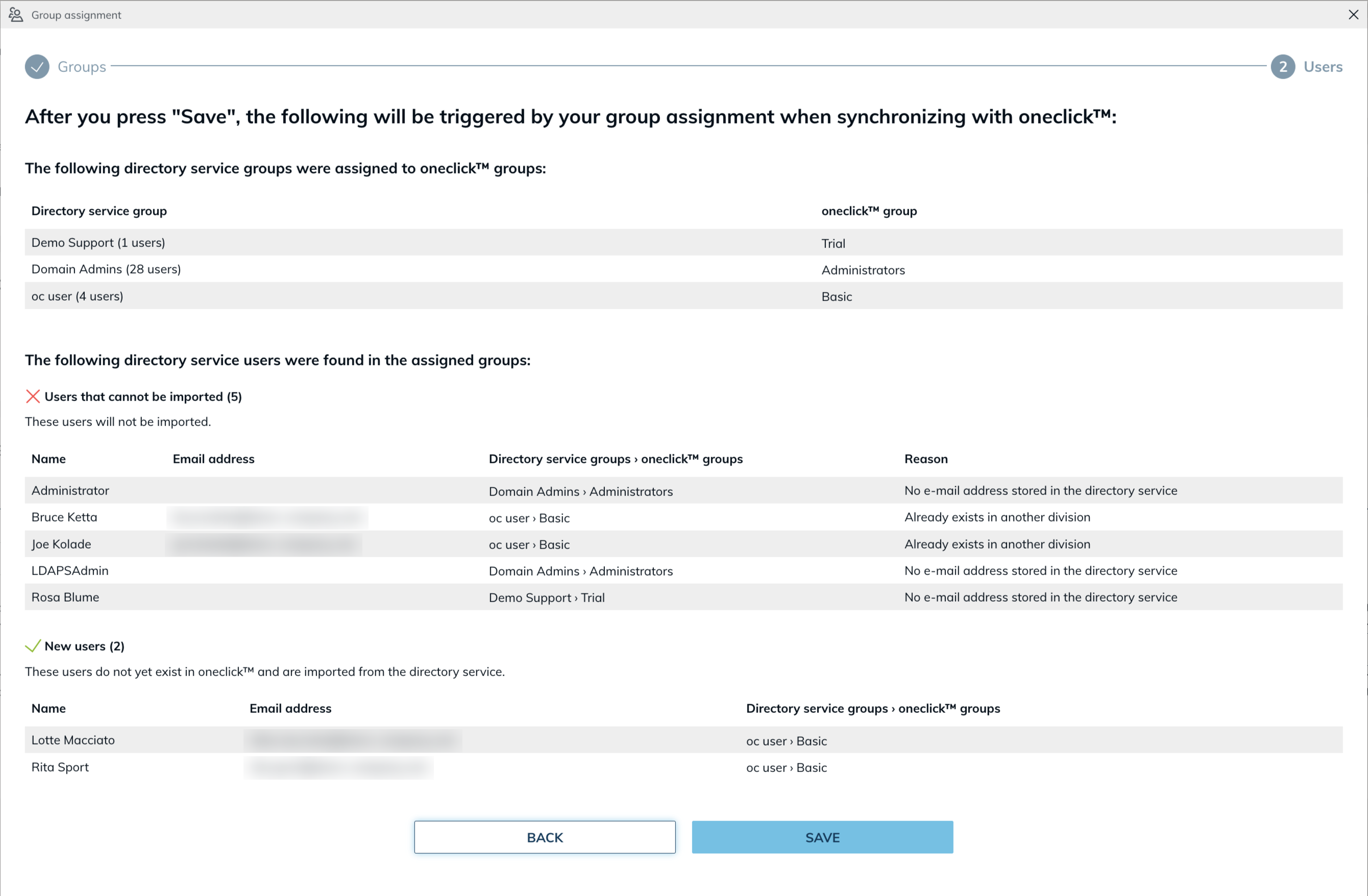
The last step of the directory service wizard now shows directory users in three separate lists instead of one table with status icons: "Users that cannot be imported", "New users", and "Existing users". Each list shows its count in the headline, and empty lists are hidden.
- For users that cannot be imported, the reason is shown in a "Reason" column instead of a tooltip, for example "No e-mail address stored in the directory service".
- For existing users, the matched oneclick™ account is shown directly in the list in the "Matched user account" column, together with how the match was made: by the object ID (objectGUID) or the directory path (DN) in the directory service, by the object ID in Microsoft Entra ID, or by the e-mail address. If saving would change that user's e-mail address, the list warns you and shows the old and the new address. Previously the hint only said that the user already exists, so a production account could be renamed and moved to another license without warning.
- Preview and import now identify users the same way. A user whose e-mail address changed in the directory used to be shown as new, although the import renamed the existing account. The preview now shows this user as existing.
- The lists no longer use tooltips, which makes the preview noticeably faster for large directories.
Directory service connections: choose how existing users are recognized
Until now, one directory object could only ever become one oneclick™ account. If two directories contain the same people, for example a production and a test directory, the second connection re-identified the existing account and overwrote its e-mail address and license. The new setting "Recognize existing users" offers two options:
- "By the object ID of the directory service" (default): the previous behavior. Users are recognized by their directory object first and by e-mail address as fallback, so an e-mail change in the directory renames the existing account.
- "By e-mail address only": users are matched strictly by e-mail address. A directory user whose address does not exist in oneclick™ becomes a new account, even if the same directory object is already linked through another connection. The original account keeps its e-mail address, license, and groups.
You set the option in the settings step when creating a connection and can change it later in the connection's edit dialog. The connection details show the current value. Existing connections keep the previous behavior. The setting is available for private directory services and Microsoft Entra ID.
Directory synchronization is faster and completes reliably
Large directory imports could run for many hours, stop halfway when a worker was restarted, or run twice in parallel. The import now runs in small chunks: a restart costs at most one chunk instead of starting over, duplicate runs are prevented, and users are no longer skipped under load. A directory with 3,700 users now synchronizes in under seven minutes instead of around 20 hours. Unchanged app instances are no longer re-saved during the import, which previously flooded open oneclick™ Desk and admin sessions with updates and slowed them down. You now receive one notification per import, for example about a full license, instead of one per chunk.
If an AD group is mapped to several oneclick™ groups, imported users are now added to all of them. Previously they only landed in the first mapped group and did not receive the app configurations, tags, and policies of the others.
TPM and Secure Boot for your own images on Open Telekom Cloud
When you create a virtual machine (VM) from one of your own images on Open Telekom Cloud, you can now enable TPM and Secure Boot. Until now the two switches were missing for own images, so the VM was always created without them and Windows 11 could complain about missing security hardware. Choose one of your own images and a machine size from the c9, m9, or pi5e families: a "Security" box with the switches "TPM" and "Secure Boot" then appears below the machine settings. The image itself must support these features. The switches are only available when creating a VM, so existing VMs must be recreated to use them. Platform-provided Windows 11 images behave as before, with both switches enabled and greyed out.
Missed updates are applied after a connection loss
If a browser tab lost its real-time connection to oneclick™, for example while the laptop was asleep or the tab was in the background, the admin kept showing outdated data until you reloaded the page. Destination pool details could then miss a new session or show a wrong user. After reconnecting, the admin now catches up on the updates it missed automatically. The same applies to the app tiles in oneclick™ Desk.
Clearer port validation
A trailing or doubled comma in a port list, for example "3389, 636,", is now accepted instead of being rejected. The error message for invalid ports now reads "Enter valid ports from 1 to 65535, separated by commas." This applies to all port fields in the admin.
Bug Fixes
- Policies with IP conditions evaluate the real client IP address: IP ranges in policies were compared against the wrong address, so the option "All except these IP ranges" in two-factor policies never matched and the second factor was always requested. Single IP addresses and ranges now match correctly. Policies restricted to specific IP ranges now take effect as well, so users at the listed addresses may be asked for a second factor for the first time. The first-time 2FA setup now also respects the group and IP rules of the policy. Login rate limiting is now applied per client IP address: previously, 30 failed logins across the platform could temporarily lock out all users.
- SSH app instances show credential fields again: App instances of SSH apps (Shell / Console) again show the fields "Username" and "Password" in the admin. Credentials that were entered before the fields disappeared are visible and editable again; instances created in the meantime need their credentials entered once. Apps that use default credentials or ask for credentials at app start are not affected.
- App instances and users tables finish loading reliably: In some divisions the table showed all rows, but the loading dots below it never stopped and the total count was missing. A failing related request or a record removed in the meantime no longer leaves the table in a loading state.
- Networks and destinations on IPsec connections save reliably: Creating or deleting a network and editing a destination on an IPsec connection no longer fail with an error when one destination has no port mapping. The misleading "overlapping CIDR" message on a retry no longer appears. Destinations created via the API without a configuration now receive mapping ports like destinations created in the admin, and editing the ports of a destination keeps the existing mapping ports instead of reassigning all of them.
- App configurations without a license display correctly: App configurations whose license was deleted are no longer shown as empty rows and can be edited again without an error. Deleting a license now also removes its app configurations in one step. The oneclick™ Desk tile of such an app configuration is disabled instead of appearing usable.
- Saved RDP files keep working in load balancing pools: For apps on a load balancing pool that are opened through the oneclick™ Gateway, a saved .rdp file stopped working as soon as load balancing assigned the user another destination, with the error 0x3000008. All connection files a user has already saved now keep working and connect to the currently assigned destination. The session history reports the destination that was actually used.
- Closing an app no longer stalls during peak hours: Closing an app could take 60 to 200 seconds during the evening peak and end with a timeout, because every stop scanned all load balancing sessions. The stop now only cleans up its own app instance. Sessions that ended without a proper close, for example a killed browser tab, no longer keep a load balancing binding alive: the sticky session period now starts for them as well, and orphaned entries no longer block a destination with a user limit of 1.
- Drive tile appears reliably: If the Drive service was temporarily unreachable while a user's Drive was set up, the user permanently had no Drive tile although the Drive account existed. The tile is now added anyway, and every user change re-checks whether it should exist. Affected users have been repaired.
- "Execute action" dropdown keeps its size and behaves correctly: The dropdown no longer shrinks when it is opened, and under "Connection" the search icon has been replaced by a chevron icon.
- Typing in dropdowns is reliable again: In Safari and other WebKit-based browsers, the first character typed into a dropdown's search could be dropped. Keyboard navigation in dropdowns has also improved.
Version / Release: 2607.03.053
Release date: 1 September 2026
Improvements
Keyboard layout for streaming in the browser
Several improvements to the keyboard layout that apps use in the browser:
- Danish layout added: the usage settings of an app configuration now offer "da-DK Qwerty" under "Keyboard layout selected on the remote system". The Danish special characters æ ø å and the characters on AltGr arrive correctly.
- "Other layout" works as intended: the option previously named "Different layout (use remote system setting)" no longer falls back to the US layout. Characters are now transferred independently of the layout, so they also arrive correctly on remote systems whose layout is not in the list — including characters beyond Western European alphabets such as ą ć ę, ğ ı ş, Greek and Cyrillic characters, and the Euro sign. Shortcuts such as Ctrl+C, Ctrl+V, and Alt+Tab work in this mode as well.
- Help text for the setting: a help icon next to the setting explains that the layout of the remote system cannot be detected automatically, and which entry to choose. The help text is available in the app configuration and on the app tile in oneclick™ Desk.
A layout from the list transfers all characters reliably, so choose "Other layout" only when the layout of the remote system is unknown or not in the list. In that mode, letter shortcuts such as Ctrl+Z can reach a different letter if the remote system uses a Qwertz-based layout that oneclick™ does not offer. As before, the setting applies to apps that are opened in the browser via oneclick™ Streaming, not to apps opened through the oneclick™ Gateway.
Maintenance mode now takes effect in load balancing pools
The "Enable maintenance mode" dialog promises that no new logins are allowed on the destinations. In pools with "Sticky user sessions" that promise did not hold: users who had worked on a destination before were connected straight back to it after it went into maintenance, while users without such a binding were distributed correctly. The same pool behaved differently from user to user, and nothing in the admin area showed it.
- Users whose reuse entry points at a destination in maintenance are now routed to a free destination of the pool instead — silently, without an error message and without anything for them to do.
- Enabling maintenance mode now releases the reuse entries on the affected destinations, so you no longer have to release them by hand in the pool details. Entries are kept for users in groups that are granted access during maintenance mode, and for users whose session is still running on that destination.
- Users with a running session can still start further apps on that destination. Moving them while the session is live could damage their Windows profile or leave them with a temporary one. These users now receive a notification asking them to save their documents and sign out of the system.
- The dialog explains what this means and what to do about it, and the "Show sessions" link takes you to the details of the affected destination pool. The link appears only for pools that reuse existing user sessions.
- If every destination of the pool is in maintenance, users now see the maintenance notice instead of a message about missing free resources.
App tiles show pool maintenance before the click
When an app uses "Best destination of the load balancing pool" as its destination, its tile is now greyed out as soon as every destination of the pool is in maintenance for that user, and shows the maintenance notice on hover. Previously the tile looked normal, and users only found out after clicking and waiting for the start to fail. Tiles change state while users are signed in, so nobody has to sign in again.
- If only part of the pool is in maintenance, the tile stays available and the app starts on a free destination — unchanged.
- The tooltip shows your notice when every destination of the pool carries the same one. If the notices differ or none is set, users see a neutral text instead, because a maintenance time taken from one destination could mislead about another.
- Tiles now apply the same rules as the app start itself. With a specific destination, users of the oneclick™ administration division and cross-division support with "Allow support access during maintenance" now see a usable tile, because the start lets them through anyway.
Group detail view opens without loading every user
Opening a group in the admin area no longer loads the complete user list of the division first. The "Users" tile now requests only the members of that group and appears while the rest of the page is still loading — previously it waited for the entire list to arrive page by page, which is what made large divisions slow. Emptying a group now shows the empty state immediately instead of leaving the tile on a loading animation. Loading the user list itself is quicker as well, because a check that ran on every page no longer searches data of the whole platform.
Bug Fixes
- Filter requests to the oneclick™ API apply all filters again:
Requests to the
/filterendpoints now evaluate every filter that is sent — OR combinations, several filters within one filter group, and several filter groups — and they applysort,limit,start, andpageagain. Previously only the first filter of the first group took effect, so a request returned more records than expected without reporting an error. Excluding filters (not) match correctly again as well, and a malformed filter or sort parameter now returns a clear error instead of an empty list. Theincludesparameter is unaffected: it was removed deliberately and this fix does not restore it. - Login via an identity provider recovers automatically: After a service interruption, login via an identity provider (Single Sign-on) could keep failing until the platform was restarted manually. oneclick™ now detects this state itself and corrects it automatically.
- Networks with an overlapping address range can be created again for cloud connections: For AWS, Azure, Google Cloud, Open Telekom Cloud, Ionos, Exoscale, Vultr, Orange, Huawei, and Ventus, a second network with an overlapping CIDR range in the same connection is accepted again — these Cloud Providers allow identical address space within one cloud account. The check stays in place for STACKIT and IPsec connections, where an overlap does cause a conflict. Networks and subnets that failed to be created or have already been deleted no longer occupy their address range, so you can create a failed network again with the same range. The check now also applies when you edit the CIDR range of a network or add a subnet.
- AD/LDAP sync no longer proposes users with a second connection for deletion: Users who are still synchronized through a second AD/LDAP connection no longer appear in the list of users proposed for deletion during sync.
- AD/Azure import no longer aborts entirely when one user hangs: A single user whose processing used to stall no longer aborts the whole import — it continues for the remaining users.
- AD/LDAP credentials no longer appear in API responses: The AD/LDAP connection's username and password are no longer returned in the corresponding API responses.
- STACKIT and OpenStack connections report the actual error: Errors from STACKIT and OpenStack connections now show the provider's actual message instead of a generic one, and a missing response now results in a timeout instead of an indefinite wait. If the multi-project query gets no response at all, it is now reported as a clear error instead of silently returning an empty list.
- Open Telekom Cloud pricing is now complete:
Instances of the
ecsflexfamily are now shown with a price as well. - AD sync group display corrected: The group display in AD sync now uses the correct separator throughout and shows the right label for empty groups.