2603.03.089
Version / Release: 2603.03.089
Release date: 21 April 2026
Improvements
Separate usage settings for browser streaming and gateway
RDP app configurations now use two tabs for usage settings: "oneclick Streaming (Browser)" and "oneclick Gateway (RDP client)". Shared settings remain visible above the tabs, while mode-specific options appear within each tab. This makes it easier to configure the right settings for each connection mode.
Expanded Active Directory group sync
The AD connection sync now supports individual group sync, group activation and deactivation, and stale group membership detection—all accessible from the connection detail page.
- Individual groups can be synced independently without affecting other group mappings
- Groups can be activated or deactivated to include or exclude them from sync
- Users who are no longer members of a mapped AD group are detected and can be removed
- Primary group resolution ensures users are assigned to all relevant groups
- License capacity is checked before creating users, preventing errors when limits are reached
Clone app configurations
App configurations can now be duplicated with a single click. The clone button in the detail view opens the creation form with all settings pre-filled—including configuration, tile settings, and policies. This saves time when setting up similar app configurations.
Groups and destination pool columns in the app configurations table
The app configurations table now includes two additional columns: "Destination Pool" and "Groups". Both columns show linked entries that can be clicked to navigate directly to the respective detail view.
Hierarchical tag sorting and filter tree
Tags now appear in hierarchical order throughout the admin area—in tables, detail views, and filters. Parent tags appear before their children, and siblings are sorted alphabetically. In filter views, the full ancestor path is always visible, making it easier to navigate complex tag structures.
New login method: Google
Users can now log in via Google. The new option is available as a login policy and works with existing oneclick accounts that share the same email address. The previous XignSys login method has been removed.
Skip scheduled VM stop events
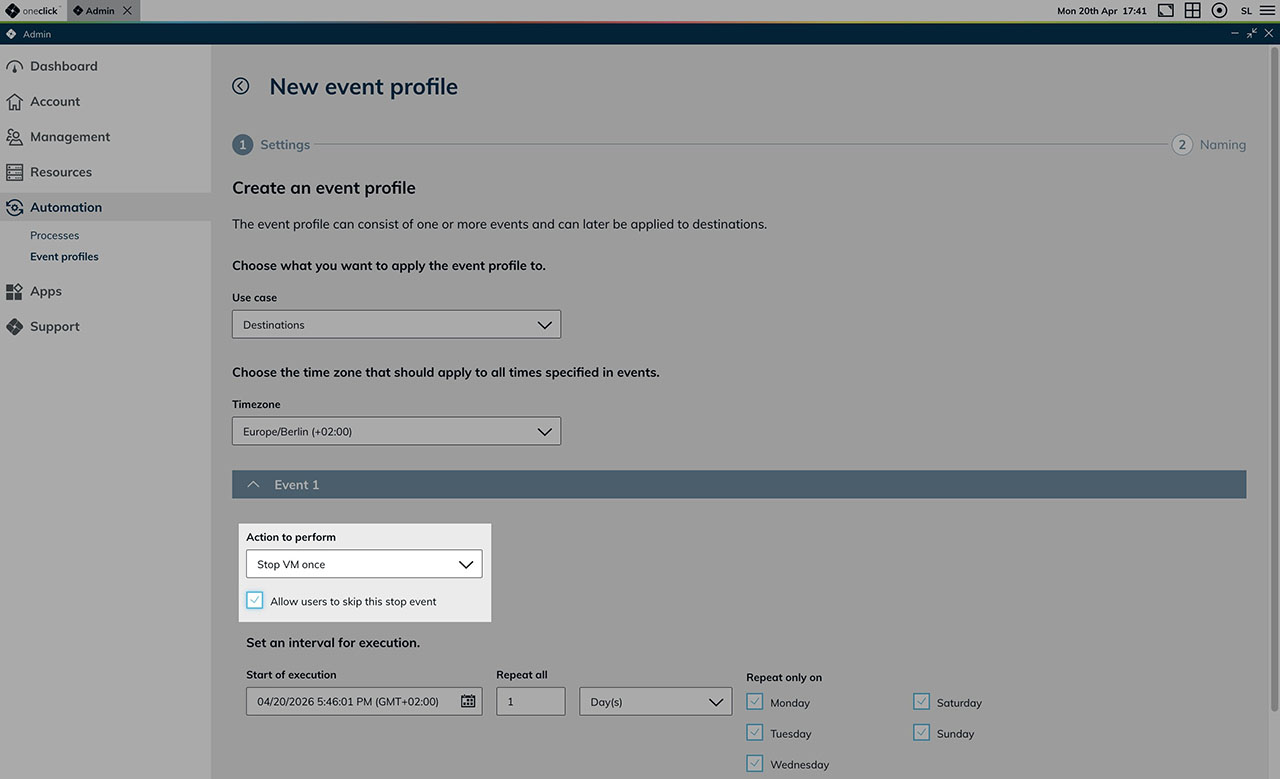
A new option in event profile settings allows users to skip upcoming scheduled VM stop events. When enabled, a "Skip next stop" link appears on the user's desk tile. Multiple consecutive stops can be skipped, and if a shutdown notification is already in progress, skipping cancels the pending stop.
Execution logs for event profiles
Event profiles now display an execution log on their detail page, recording the outcome of each scheduled run—including the event type, status, and any relevant message. The log updates in real time and can be filtered by event type and status.
Destination pool assignment visible in destinations
The destinations table now includes a "Destination Pools" column showing which pools a destination belongs to. On the destination detail page, a new section lists all assigned pools along with their configured ports—and can be edited directly without leaving the page.
Linked entity names in delete confirmation dialogs
When deleting networks or destinations, the names of affected entities shown in the confirmation dialog are now clickable links. This makes it easy to review related destinations, networks, and network security groups before confirming the deletion.
Bulk permission assignment in roles
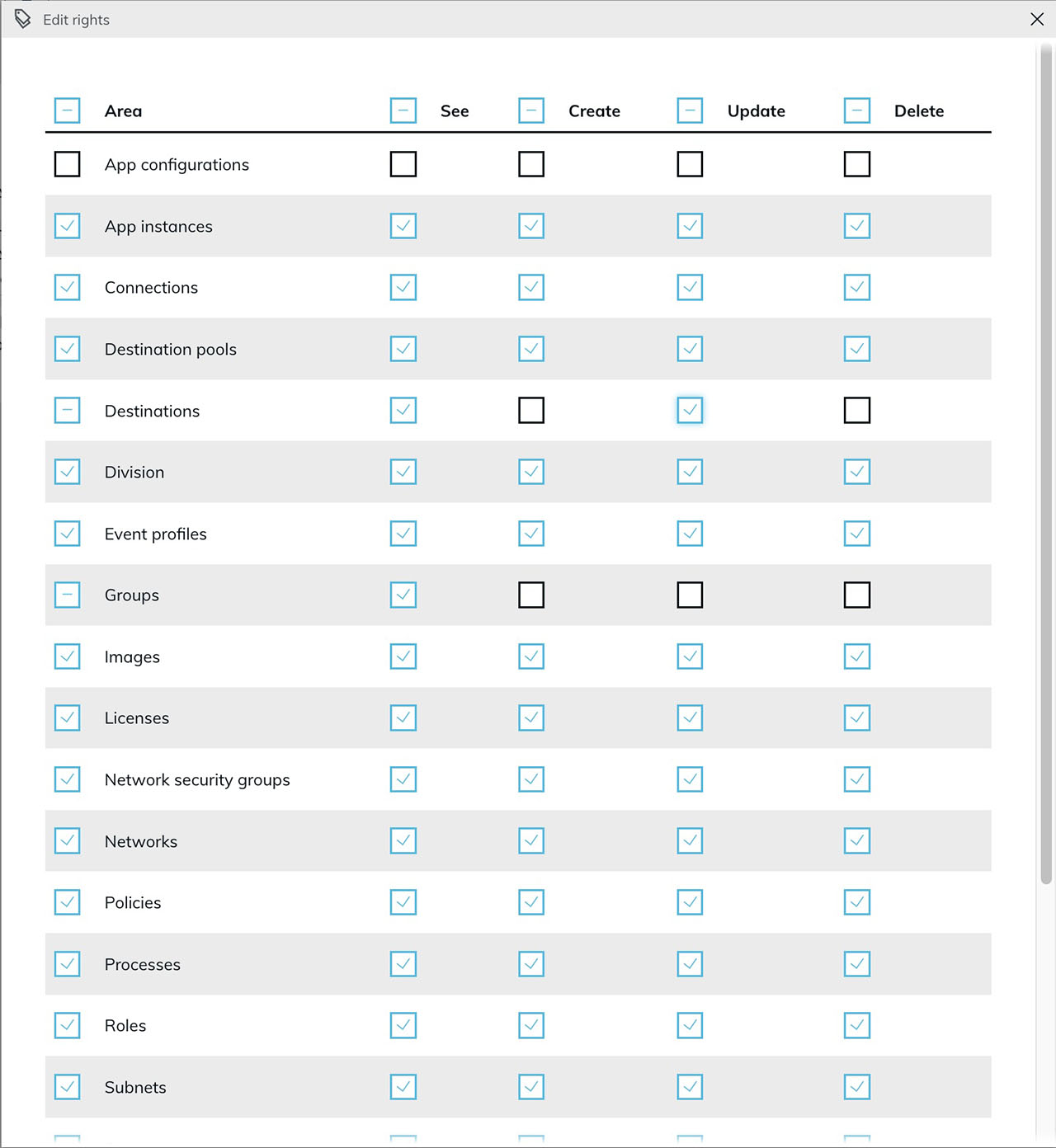
Permissions in the roles management view can now be selected or deselected per column using header checkboxes. Each row also has a leading checkbox to toggle all permissions for a single resource at once. This makes it significantly faster to set up common role configurations such as read-only or no-delete roles.
Entity IDs visible on all detail pages
Every detail page in the admin area now shows the record's ID directly next to the name—for users, groups, roles, policies, licenses, connections, networks, app configurations, and more. This makes it easier to reference specific records when working with the API or raising a support request.
Password confirmation when setting or resetting passwords
Setting or resetting a password now requires entering the new password twice. The confirmation field prevents accidental typos in masked password fields, and the submit button remains disabled until both entries match.
Stronger platform security
Several security improvements have been implemented based on an external penetration test:
- Password reset requests are now rate-limited to prevent misuse
- API error responses no longer expose internal database details
- A comprehensive Content Security Policy has been added across all platform services
- Server version information is no longer disclosed in error responses
- Session tokens are no longer transmitted as part of the URL
- Changing a password now requires the current password to be entered, preventing unauthorized password changes on shared devices
Bug Fixes
- Faster user creation with many users and groups: Creating users in environments with a large number of existing users and groups is now significantly faster. Optimized database queries now avoid redundant lookups during user and group assignment.
- Faster license loading in the admin area: License data in the admin area now loads more efficiently, reducing the number of requests to the backend.
- Usage count for processes in the event profiles table now correct: The "used" counter for processes now reflects the correct number of assignments.
- Default values in the license wizard now reset correctly: When switching between license types in the creation wizard, all default input values—such as the license name—now update to match the selected type.
- Login policy name corrected to "Microsoft Entra ID": The default policy name "Allow login with Azure" now reads "Allow login with Microsoft Entra ID" to reflect the correct product terminology.
- Copying field values from detail views no longer duplicates content: Copying values such as email addresses from the detail view no longer results in duplicated text with leading whitespace in the clipboard.