Installing language packs fails
Do you need an alternative language for the operating system on a Windows based computer, but the installation failed?
The following steps might help:
- Click on the Windows icon at the bottom left of your screen. Type "cmd.exe" in the search bar, then right-click on cmd.exe in the suggestion list and click on Run as administrator.
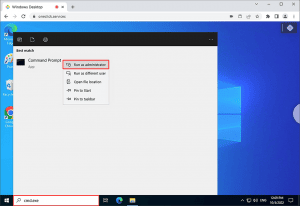
- In the opened command prompt shell, enter the following commands one after another.
Execute each command individually by pressing Enter and wait for the response before proceeding.net stop wuauservnet stop cryptSvcnet stop bitsnet stop msiserverren C:\Windows\SoftwareDistribution SoftwareDistribution.oldren C:\Windows\System32\catroot2 Catroot2.oldnet start wuauservnet start cryptSvcnet start bitsnet start msiserverwuauclt /resetauthorizationwuauclt /detectnow - After entering the command string, try again and install the language pack. If it still fails, enter the following additional commands. Also execute these individually by pressing Enter and wait for feedback in each case:
wuauclt /resetauthorizationwuauclt /detectnow
It may be necessary to restart the computer to apply the changes.