Delete oneclick™ Mesh
Before you begin uninstalling the oneclick™ Mesh Client and the oneclick™ Mesh Client Manager, ensure that no active connections or processes dependent on these programs are running.
Windows
- Open the "System settings".
- Under the "Apps & Features" item, you will find the "oneclick Mesh Client" and the "oneclick Mesh Client Manager". Click on Uninstall for both programs.
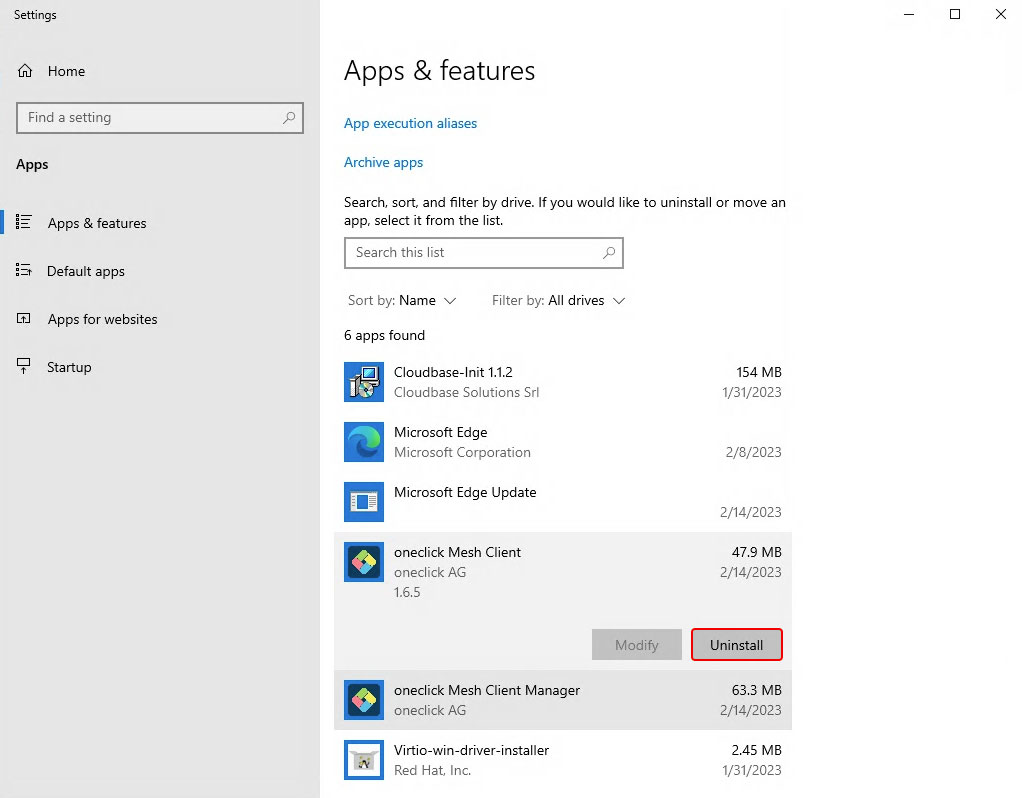
The mesh client has been successfully uninstalled.
Mac OS
- Open the file "remove.command" with a double click (or by: right click/open).
If you no longer possess the file, you can download it again in the oneclick™ Admin. - Enter your password.
- Close the window when prompted. The mesh client has been successfully uninstalled.
Linux
- Open the folder as "root" user and run the file ./remove.sh.
This also works with "sudo". If you no longer possess the file, you can download it again in the oneclick™ Admin. - The mesh client has been successfully uninstalled.