Performance limitations for moving images
Do you see this message in the Streaming settings?
For smooth streaming, you or your administrator should check your firewall to see if the domain datacenter-turn.oneclick.services is open for port 443 TCP & UDP.
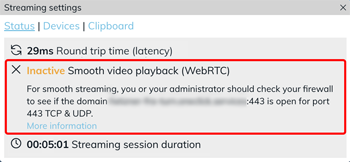
As long as this message is displayed, the Smooth videos option in the streaming optimization has no effect. Does your application work as usual? You can continue working. Forward the message to your administrator anyway so they can check the firewall setting.
Users with access to the oneclick™ Desk can change the streaming optimization themselves via the app tile. The Smooth videos option works as usual only after your administrator has configured the firewall rule.
Check the status in the streaming settings
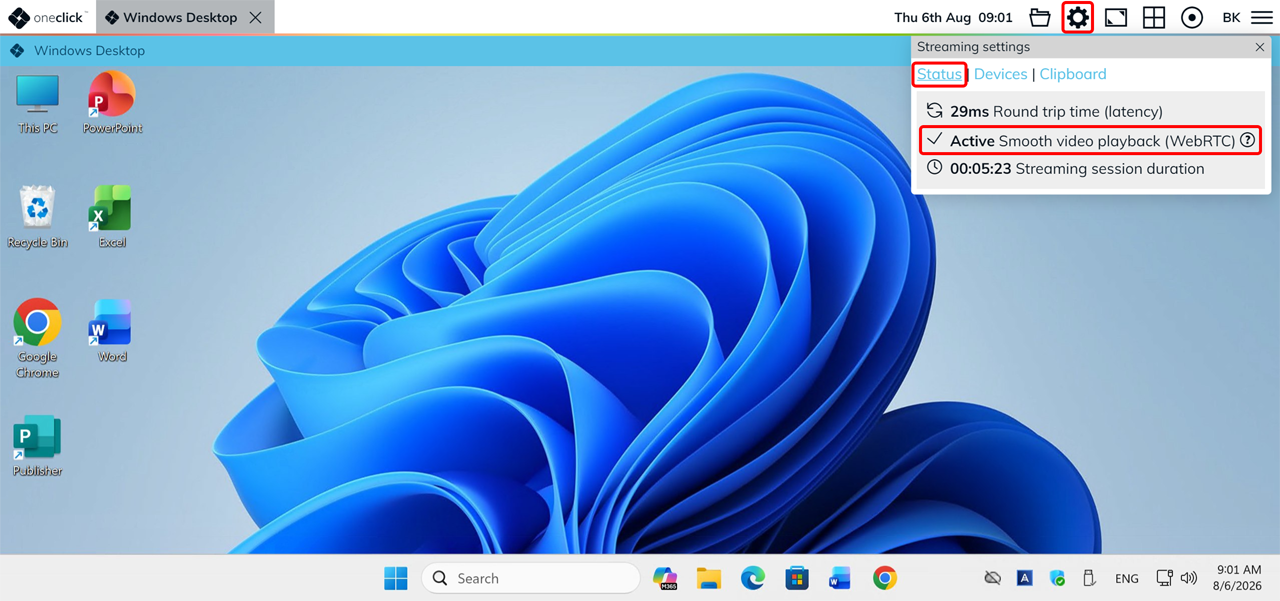
- During an active connection, click the Gear icon in the oneclick™ menu to open the Streaming settings.
- Click Status.
If the firewall rule is configured correctly, the Streaming settings show "Active Smooth video playback (WebRTC)" under Status.
Are you experiencing performance limitations?
Forward the message to your administrator. The required firewall configuration steps are described under Optimize streaming performance.