Desk menu
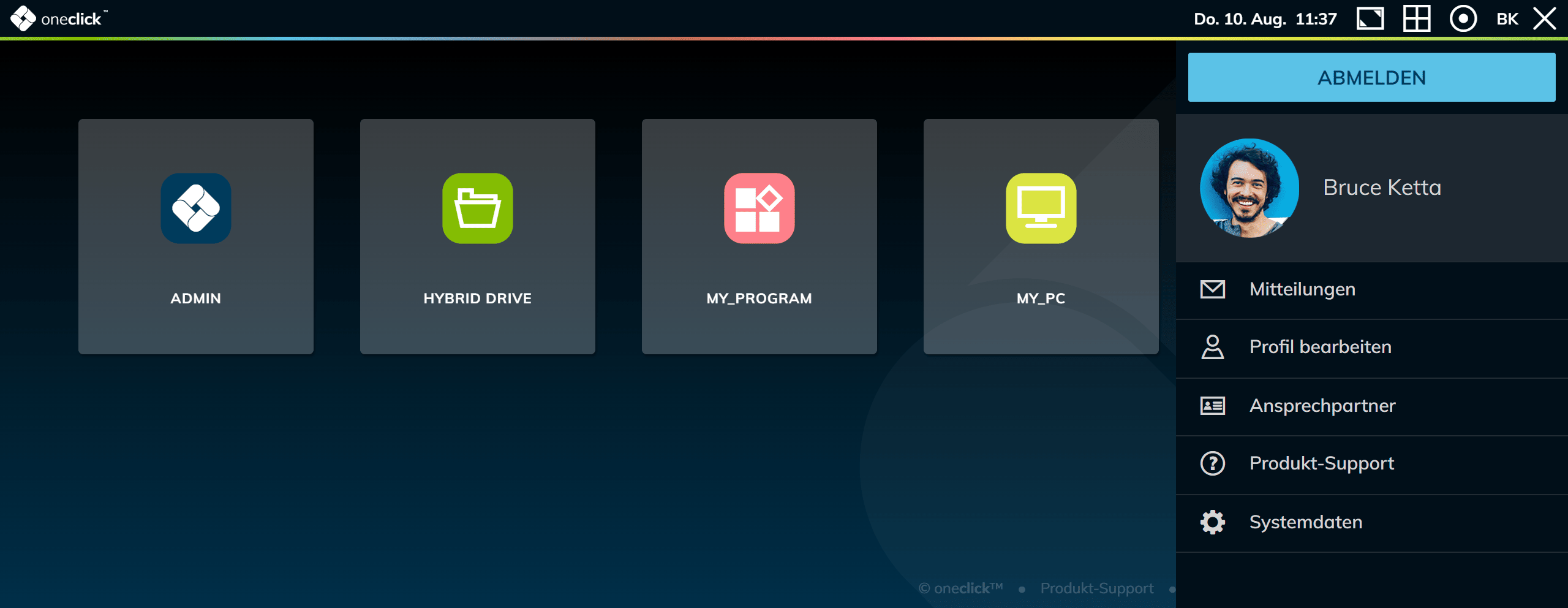
The Desk menu in oneclick™ allows you to manage and customize your working environment according to your needs. Below you will find a detailed explanation of the various options in the desk menu.
Image
oneclick™ automatically synchronizes your profile picture with the one stored in Gravatar. Make sure that the email address you have registered to oneclick™ with is also stored as the primary email address in Gravatar.
Notifications
All status messages of your current session will be stored and displayed here. These messages will inform you, for example, when a virtual machine is started or shut down or when settings are saved within your session.
Edit profile
Under the Edit profile item, you have the option of making various adjustments to your profile. Change your name, select your preferred language and update your password. You can also change settings for the Workspace appearance here.
Your email address and your mobile phone number are bound to your user account. You cannot change them yourself — only an administrator can. For all details of the profile, see Edit profile.
Contact persons
The Contact persons section lists the contact persons entered by administrators within the administrative unit. These contact persons serve as important contacts for any concerns or questions regarding the system.
Product support
Clicking on Product support will take you directly to the oneclick™ help platform. There you will find an extensive collection of documentation and frequently asked questions (FAQ) that will help you when using oneclick™.
System data
The System data section contains all relevant information, including system-related data, which is required in the event of support requests.