2603.03.089
Version / Release: 2603.03.089
Release date: 21 April 2026
Improvements
Separate settings for browser streaming and gateway
If your administrator has granted you permission to choose between browser streaming and gateway mode, the usage settings are now organized into two clear tabs: "oneclick Streaming (Browser)" and "oneclick Gateway (RDP client)". Shared settings remain visible above the tabs, while options specific to each mode are grouped within the respective tab.
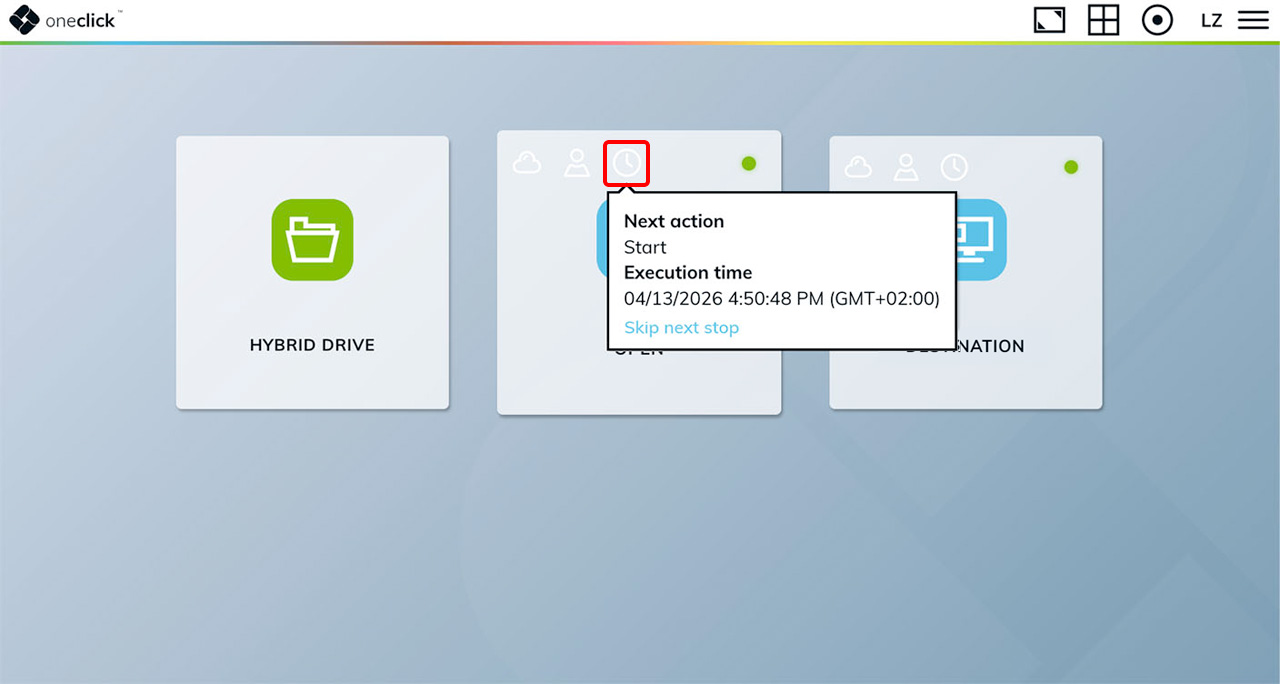
Skip scheduled stop events
If your administrator has enabled this option, you can now skip upcoming scheduled VM stop events directly from your desk tile. Hover over the clock icon to see the next scheduled stop, and click "Skip next stop" to postpone it. Multiple consecutive stops can be skipped, and if a shutdown notification is already in progress, skipping cancels the pending stop.
Password confirmation when resetting your password
Resetting your password now requires you to enter the new password twice. This prevents accidental typos in the masked password field. The submit button stays disabled until both entries match.
Current password required when changing password
Changing your password now requires you to enter your current password first. This protects your account on shared devices, where brief unattended access could otherwise be used to lock you out.
Bug Fixes
- "Reset credentials" button now works when the password has expired: Clicking "Reset credentials" in the connection error dialog now opens the credential input form as expected, even when the error is caused by an expired password.
- Resetting credentials no longer clears stored login data when cancelled: Previously, clicking "Reset credentials" and then cancelling the dialog would still delete the stored username and password. A confirmation dialog now appears before any data is removed.